Browse Internet at a High-Speed as 500 Mbps Speed for FREE with your Existing Internet Connection
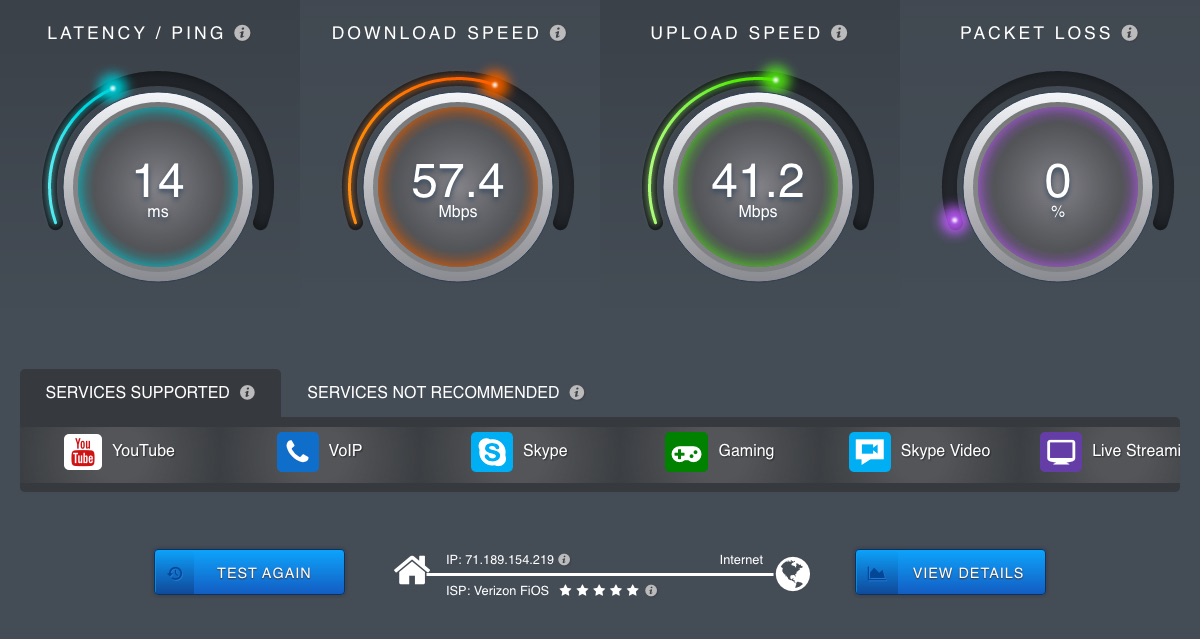
Internet is a sensation nowadays. You can’t ever imagine your life without internet. It makes your life too easy. As we all know only thing is worse than no internet is slow internet. You know that you can browse internet at a speed of 500 Mbps Speed for free. Yes you heard it right. By a website called Rabb.it you can easily enjoy 500 Mbps speed internet. There are many tricks to increase internet speed but this works like a charm.
Rabb.it is a remote desktop with a browser where you have full control over it. It increases your internet speed with over a 500 Mbps download speed and 2000 Mbps upload speed. Isn’t that amazing. You can also watch videos on YouTube, Hulu, Netflix etc right away without any slow-moving buffering. It also comes with group chat service with voice & video support. As I checked it, it comes with virtualized chrome and Ad blocker plus pre-installed.
If you have an internet connection with 1-2 Mbps speed then you will definitely gonna love this trick. Highly Recommended.
Features of Rabb.it –
Rabb.it has some excellent features available to enhance your internet using experience. By signing up with Rabb.it you can easily avail these features. So have a look at it.
1. You can chat wit your friends and do video chatting.
2. By using it you can watch your favorite videos, movies and other videos too.
3. Totally free, use it without spending a single penny.
4. It has a browser called Rabbitcast in which you can do everything just like your normal PC browser.
5. Enjoy downloading speed of 500 Mbps and uploading speed of 2000 Mbps.
And Many More…
Browse Internet at a High-Speed as 500 Mbps Speed for FREE with your Existing Internet Connection

Internet is a sensation nowadays. You can’t ever imagine your life without internet. It makes your life too easy. As we all know only thing is worse than no internet is slow internet. You know that you can browse internet at a speed of 500 Mbps Speed for free. Yes you heard it right. By a website called Rabb.it you can easily enjoy 500 Mbps speed internet. There are many tricks to increase internet speed but this works like a charm.
Rabb.it is a remote desktop with a browser where you have full control over it. It increases your internet speed with over a 500 Mbps download speed and 2000 Mbps upload speed. Isn’t that amazing. You can also watch videos on YouTube, Hulu, Netflix etc right away without any slow-moving buffering. It also comes with group chat service with voice & video support. As I checked it, it comes with virtualized chrome and Ad blocker plus pre-installed.
If you have an internet connection with 1-2 Mbps speed then you will definitely gonna love this trick. Highly Recommended – How to create unlimited Email Accounts.
Features of Rabb.it –
Rabb.it has some excellent features available to enhance your internet using experience. By signing up with Rabb.it you can easily avail these features. So have a look at it.
1. You can chat wit your friends and do video chatting.
2. By using it you can watch your favorite videos, movies and other videos too.
3. Totally free, use it without spending a single penny.
4. It has a browser called Rabbitcast in which you can do everything just like your normal PC browser.
5. Enjoy downloading speed of 500 Mbps and uploading speed of 2000 Mbps.
And Many More…
Requirements –
1. You will need an internet connection of at least speed 1 Mbps for better results.
2. You will need a PC, laptop or Android mobile with minimum requirement of Android 4.1 and Chrome 50.
3. A free Rabb.it account, [Follow below steps to create one].
How to use Rabb.it for a speed of 500 Mbps –
1. First of all, open the Rabb.it homepage – Click here to Redirect.
2. Hit the sign up button. You can also sign up with Facebook to enter your information automatically.

3. Choose an available username of your choice.
4. Now confirm your account by clicking on the mail you have received.
5. Holla! You have successfully created a Rabb.it account.
8. Select “Messages Only” and it will open a new window.
Browse Internet at a High-Speed as 500 Mbps Speed for FREE with your Existing Internet Connection
Internet is a sensation nowadays. You can’t ever imagine your life without internet. It makes your life too easy. As we all know only thing is worse than no internet is slow internet. You know that you can browse internet at a speed of 500 Mbps Speed for free. Yes you heard it right. By a website called Rabb.it you can easily enjoy 500 Mbps speed internet. There are many tricks to increase internet speed but this works like a charm.
Rabb.it is a remote desktop with a browser where you have full control over it. It increases your internet speed with over a 500 Mbps download speed and 2000 Mbps upload speed. Isn’t that amazing. You can also watch videos on YouTube, Hulu, Netflix etc right away without any slow-moving buffering. It also comes with group chat service with voice & video support. As I checked it, it comes with virtualized chrome and Ad blocker plus pre-installed.
If you have an internet connection with 1-2 Mbps speed then you will definitely gonna love this trick. Highly Recommended – How to create unlimited Email Accounts.
Features of Rabb.it –
Rabb.it has some excellent features available to enhance your internet using experience. By signing up with Rabb.it you can easily avail these features. So have a look at it.
1. You can chat wit your friends and do video chatting.
2. By using it you can watch your favorite videos, movies and other videos too.
3. Totally free, use it without spending a single penny.
4. It has a browser called Rabbitcast in which you can do everything just like your normal PC browser.
5. Enjoy downloading speed of 500 Mbps and uploading speed of 2000 Mbps.
And Many More…
Also Read – 10 hidden Google tricks you never know
Requirements –
1. You will need an internet connection of at least speed 1 Mbps for better results.
2. You will need a PC, laptop or Android mobile with minimum requirement of Android 4.1 and Chrome 50.
3. A free Rabb.it account, [Follow below steps to create one].
Below I have shared the steps you need to follow to create an account in Rabb.it.
Also Read – How to Reduce Data Usage on Android
How to use Rabb.it for a speed of 500 Mbps –
1. First of all, open the Rabb.it homepage – Click here to Redirect.
2. Hit the sign up button. You can also sign up with Facebook to enter your information automatically.
3. Choose an available username of your choice.
4. Now confirm your account by clicking on the mail you have received.
5. Holla! You have successfully created a Rabb.it account.
8. Select “Messages Only” and it will open a new window.
7. Then select the “Decide what to watch” option
9. Now enter the URL in below box or you can choose YouTube or Netflix for online streaming
10. Now you can see a Chrome Remote Desktop appear in your screen. Type Speedtest.net in your URL box and check the speed.
11. If you don’t like the video quality you can simply increase the quality from Low Definition to High Definition.
Currently Redd.it is available for iPhone users only. If you want to use it in your Android phone then use login in Redd.it with the latest version of Google Chrome. And don’t worry about your information, Rabbitcast does not save any of your information.
