HIGHLIGHTS
Motorola Mobility is one of several first-wave mobile phone manufacturers that have blinked out of independent existence over the past few years; unable to compete in a cut-throat, oversaturated, highly commoditised market. Unlike some of its less fortunate former rivals though, its brand and legacy are living on under Lenovo's leadership. The Moto product portfolio became something of a showcase for pure, unmodified Android when the company was directly under Google's leadership, and sensing a good thing, Lenovo has largely left things as they were and continued down the same path.
A few things have changed in terms of branding and segmentation, which shows that sticking to your roots doesn't mean stagnating. The much-loved premium Moto X series is now called Moto Z, and has a whole new identity based around snap-on accessories. LG tried a similar approach with its G5 (Review) flagship earlier this year, but inelegant implementation and a limited number of accessories haven't helped make this a must-have feature, so let's hope that Lenovo and Motorola's combined design expertise has done better.
Moto Z look and feel
The new Moto Z is a slab of metal and glass, and we wouldn't have accepted anything less at this price point. That said, it doesn't have the wow factor of some of its contemporaries, such as Samsung's Galaxy S7 (Review) or even the current crop of iPhones, with their curved glass and ultra-minimalist lines. That's partly because of the prominent earpiece, front camera and flash, Moto branding, and fingerprint sensor on the front face.
The Moto Z seems a bit taller than necessary, with a lot of chin-space below the screen. There's a square-shaped fingerprint sensor here with a Moto logo above it, leaving a lot of blank space on either side. The sensor looks and seems like a Home button, but in fact it isn't - you have the standard on-screen Android controls for navigation, and the sensor doesn't do anything but lock and unlock the screen. Throughout our time with the Moto Z, we kept reaching for it thinking it was a Home button, only to unintentionally lock the phone when we least wanted to.
 The sides of the phone are formed into a continuous metal frame. The left is blank, the top has only the hybrid SIM tray, the bottom has a USB Type-C port, and there's no 3.5mm audio socket. The power and volume buttons are on the right and are all very small, stubby and hard to tell apart, other than a slight texture on the power button.
Unlike most phones, the most interesting part of the Moto Z is its rear. This is where all the modular magic happens. On its own, the phone is pretty thin with a protruding disc near the top that houses the camera lens and dual-LED flash. Lower down, you'll see a wide strip of metallic contact points for the assorted "Motomods", which snap onto the phone's rear magnetically. When you aren't using a mod, you can pop on a functionless "style shell" that covers the contacts and adds some thickness to the phone, coming up flush with the camera bump.
The sides of the phone are formed into a continuous metal frame. The left is blank, the top has only the hybrid SIM tray, the bottom has a USB Type-C port, and there's no 3.5mm audio socket. The power and volume buttons are on the right and are all very small, stubby and hard to tell apart, other than a slight texture on the power button.
Unlike most phones, the most interesting part of the Moto Z is its rear. This is where all the modular magic happens. On its own, the phone is pretty thin with a protruding disc near the top that houses the camera lens and dual-LED flash. Lower down, you'll see a wide strip of metallic contact points for the assorted "Motomods", which snap onto the phone's rear magnetically. When you aren't using a mod, you can pop on a functionless "style shell" that covers the contacts and adds some thickness to the phone, coming up flush with the camera bump.
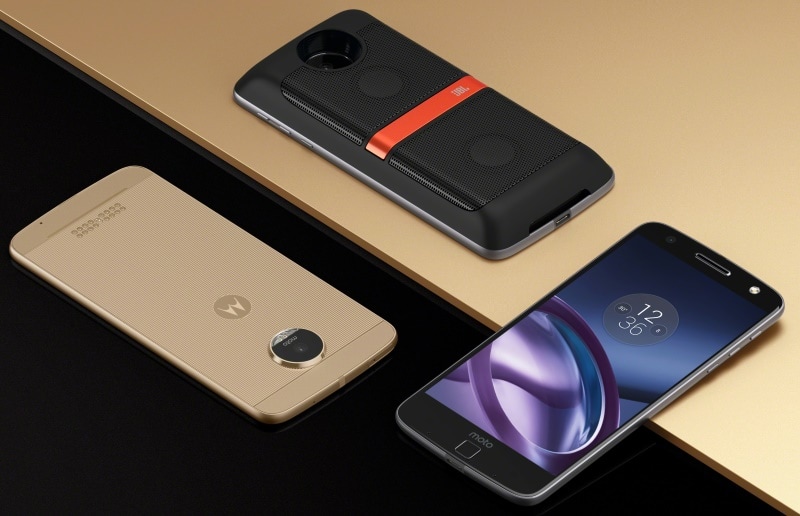 You can certainly use the phone without any mods or shells attached, but it's uncomfortable to hold because of sharp edges. Our review unit came with a wood-grain style shell reminiscent of previous Moto phones. Assorted colours and textures are available so you can change the look of your Moto Z whenever you feel like. The shell really improved the grip of our phone, and we didn't mind the added thickness at all.
Motorola is advertising four mods at launch time: an extended battery developed by Incipio, a more powerful camera with Hasselblad's name on it, a speaker from JBL, and a projector that seems to have been created in-house. There's clearly been an effort to tie up with external companies and bring their expertise to Moto Z users, and the company promises that more are to come. Even better, the same mods already work with the Moto Z Play, and future models should be compatible. This is a much stronger showing than LG, which still has just one G5 "friend" - a simple camera grip with an additional battery - available in India.
Moto Z specifications and software
You can certainly use the phone without any mods or shells attached, but it's uncomfortable to hold because of sharp edges. Our review unit came with a wood-grain style shell reminiscent of previous Moto phones. Assorted colours and textures are available so you can change the look of your Moto Z whenever you feel like. The shell really improved the grip of our phone, and we didn't mind the added thickness at all.
Motorola is advertising four mods at launch time: an extended battery developed by Incipio, a more powerful camera with Hasselblad's name on it, a speaker from JBL, and a projector that seems to have been created in-house. There's clearly been an effort to tie up with external companies and bring their expertise to Moto Z users, and the company promises that more are to come. Even better, the same mods already work with the Moto Z Play, and future models should be compatible. This is a much stronger showing than LG, which still has just one G5 "friend" - a simple camera grip with an additional battery - available in India.
Moto Z specifications and software
The Moto Z's spec sheet is pretty impressive, but perhaps not enough to distance itself from lower-priced phones such as the OnePlus 3 and Asus ZenFone 3. There's a quad-core 1.8GHz Qualcomm Snapdragon 820 processor with integrated Adreno 530 graphics, 4GB of RAM, and a generous 64GB of storage. MicroSD cards of up to 2TB (theoretical) are supported, but at the cost of a second SIM because of the space-saving hybrid SIM design.
 The screen is a standard 5.5 inches diagonally, but it has a resolution of 1440x2560 which is where most low-priced "flagship killers" hold back. Sure, you don't exactly suffer with 1080x1920 at this size, but more is always better, and the density of 535ppi makes for some extremely sharp images. The battery comes in at 2600mAh, and Motorola promises up to 7 hours of power with just 15 minutes of charging.
The rear camera has a 13-megapixel sensor, laser autofocus, and f/1.8 aperture, but its most interesting spec is optical image stabilisation, which is uncommon on phones at any price level. The front camera is a more modest 5-megapixel unit but also has a wide-angle lens, its own flash, and a larger sensor for increased low-light performance.
There's Wi-Fi 802.11ac, Bluetooth 4.1, NFC, A-GPS, and a number of motion and environmental sensors. You get LTE support on Indian bands but there's no mention of VoLTE. The Moto Z is also conspicuously absent from this list and we can only hope that VoLTE can be implemented with a software update.
Android 6.0.1 runs with virtually no customisations, which is a good thing for the most part. Along with ugly skins and bloatware, we've seen a lot genuinely useful third-party improvements. We miss simple things that are standard on most other phones, such as a battery percentage indicator.
In particular, we feel that not being able to use the fingerprint sensor to trigger different actions or secure specific files and apps is a missed opportunity for the Moto Z. The sensor is not a button, so it's triggered as soon as you touch the surface. You can wake the phone from standby and unlock it in one motion with an enrolled fingerprint, but when the phone is in use, touching the sensor will immediately lock it regardless of finger you use. That makes inadvertent touches all the more frustrating.
The Moto Z's biggest software tweak is the Active Display feature, which we've seen on previous Motorola phones. When the Moto Z is in standby and you wave your hand over the front or pull it out of a pocket, a low-power monochrome readout will show you the time and icons denoting missed notifications. It's interactive, so you can tap to see the contents of your notifications or launch into the apps that generated them.
The screen is a standard 5.5 inches diagonally, but it has a resolution of 1440x2560 which is where most low-priced "flagship killers" hold back. Sure, you don't exactly suffer with 1080x1920 at this size, but more is always better, and the density of 535ppi makes for some extremely sharp images. The battery comes in at 2600mAh, and Motorola promises up to 7 hours of power with just 15 minutes of charging.
The rear camera has a 13-megapixel sensor, laser autofocus, and f/1.8 aperture, but its most interesting spec is optical image stabilisation, which is uncommon on phones at any price level. The front camera is a more modest 5-megapixel unit but also has a wide-angle lens, its own flash, and a larger sensor for increased low-light performance.
There's Wi-Fi 802.11ac, Bluetooth 4.1, NFC, A-GPS, and a number of motion and environmental sensors. You get LTE support on Indian bands but there's no mention of VoLTE. The Moto Z is also conspicuously absent from this list and we can only hope that VoLTE can be implemented with a software update.
Android 6.0.1 runs with virtually no customisations, which is a good thing for the most part. Along with ugly skins and bloatware, we've seen a lot genuinely useful third-party improvements. We miss simple things that are standard on most other phones, such as a battery percentage indicator.
In particular, we feel that not being able to use the fingerprint sensor to trigger different actions or secure specific files and apps is a missed opportunity for the Moto Z. The sensor is not a button, so it's triggered as soon as you touch the surface. You can wake the phone from standby and unlock it in one motion with an enrolled fingerprint, but when the phone is in use, touching the sensor will immediately lock it regardless of finger you use. That makes inadvertent touches all the more frustrating.
The Moto Z's biggest software tweak is the Active Display feature, which we've seen on previous Motorola phones. When the Moto Z is in standby and you wave your hand over the front or pull it out of a pocket, a low-power monochrome readout will show you the time and icons denoting missed notifications. It's interactive, so you can tap to see the contents of your notifications or launch into the apps that generated them.
 There are some gesture and voice controls. You can quickly launch into the camera app, even from standby, with a double-flick of the wrist. We found this quite useful and it became a habit without us even realising it. Similarly, a double-chop motion triggers the flashlight. The voice feature essentially lets you set your own phrase to trigger a Google voice search, and can also read out messages text messages if you let it.
Motorola has added only one app of its own, simply titled Moto. It has controls for the Active Display, gestures, and voice assistant. There's an icon labelled Moto Mods but it's a link to a Web page, not a control app as we first guessed.
Moto Z performance
There are some gesture and voice controls. You can quickly launch into the camera app, even from standby, with a double-flick of the wrist. We found this quite useful and it became a habit without us even realising it. Similarly, a double-chop motion triggers the flashlight. The voice feature essentially lets you set your own phrase to trigger a Google voice search, and can also read out messages text messages if you let it.
Motorola has added only one app of its own, simply titled Moto. It has controls for the Active Display, gestures, and voice assistant. There's an icon labelled Moto Mods but it's a link to a Web page, not a control app as we first guessed.
Moto Z performance
Like most phones with screens this large, the Moto Z is a bit unwieldy. Grip and comfort are definitely improved when the style shell is attached. That extra padding at the rear also helps when the phone gets hot, which does happen. Both the front and rear of the lower half get quite toasty within minutes of playing a 3D game or using the camera.
Videos of all formats played perfectly well. The screen is bright and vibrant, even under harsh sunlight. The single built-in speaker is decent for games and surprisingly clear for voices in videos, though music doesn't sound particularly rich. The headphones included in the box sound decent but are made of hard plastic and have a rather uncomfortable fit.
As far as general performance is concerned, nothing we did caused the Moto Z to slow down at all. We were quite happy even with several large apps running in the background and loads of browser tabs open. We scored 3,974 in Geekbench's multi-core CPU test, and AnTuTu gave us 132,196. Graphics tests also did really well, with 25,038 in 3DMark's Ice Storm Unlimited test and 52fps in GFXBench
Motorola has replaced the default camera app, and the one on the Moto Z is pretty easy to get started with. There's a pro mode with controls for focus, white balance, ISO, shutter speed, and exposure compensation. Video and slow motion are their own modes. The app can also detect and handle bar codes, QR codes, and business cards. If the app is running, the same double-twist gesture that launches it from anywhere switches between the front and back cameras. The settings menu is fairly sparse but we were surprised to see that photos are cropped to 16:9 by default, for an effective 9.7-megapixel resolution as opposed to the sensor's actual capability of 13 megapixels at 4:3.
We found photo quality to be highly impressive. Starting with photos taken in daylight, we were happy to find that fine details on objects were captured well even at a distance. Some textures were a bit lacking and autofocus was sometimes an issue, but overall quality is one of the things that helps the Moto Z justify its price.

 Night-time shots also came out remarkably well - there was certainly noise and some motion blur, but we got a lot of usable shots, and you won't have any problem unless you zoom in to full size. Video is recorded at 1080p30 by default but you can go up to 1080p60 and even 4K30. The clips we took were crisp and bright, with decent motion and audio. The front camera is quite capable, but we found the flash too powerful for arm's-length range, resulting in more than one shot of us with our eyes reflexively jammed shut. Given how good the built-in camera is, we're intrigued by the possibilities presented by the Hasselblad mod - our review of that accessory is coming up soon.
 Battery life was disappointing at first; far below Motorola's claimed 12 hours of usage. Our video loop test consistently returned disappointing results, so we asked the company to send across a second unit to test. This one did far better, running for 13 hours, 4 minutes. We hope that the strange behaviour was isolated to the one review unit we first received. Outside of formal tests, the phone seemed to get through a full day just fine, even with a bit of gaming and lots of video streaming over LTE and Wi-Fi. Charging is pretty quick - we got up to 20 percent in under 15 minutes, and 45 percent in 30 minutes.
Verdict
Battery life was disappointing at first; far below Motorola's claimed 12 hours of usage. Our video loop test consistently returned disappointing results, so we asked the company to send across a second unit to test. This one did far better, running for 13 hours, 4 minutes. We hope that the strange behaviour was isolated to the one review unit we first received. Outside of formal tests, the phone seemed to get through a full day just fine, even with a bit of gaming and lots of video streaming over LTE and Wi-Fi. Charging is pretty quick - we got up to 20 percent in under 15 minutes, and 45 percent in 30 minutes.
Verdict
Motorola's take on a modular smartphone is definitely a lot stronger than any other we've seen before. Even without considering the mods, the new Moto Z is a powerful, stylish phone with a lot to offer. Almost everything about it looks good and works well. This is a great phone for those who want style and power, but aren't necessarily going to run heavy apps all the time. The ability to use mods is of course the biggest draw, so be sure to read our detailed piece of the Hasselblad True Zoom camera, JBL Soundboost speaker, and Moto Insta-share projector, coming up soon.
However, it does have a few problems, including the awkward fingerprint sensor and the fact that it can get rather hot. It's also more expensive than the OnePlus 3 and ZenFone 3 - and that's before factoring in the cost of mods. If none of the mods appeal to you, then it might not be worth paying so much more just to gain the ability to use them, and you might want to look at the slicker Samsung Galaxy S7 instead.

Motorola Mobility is one of several first-wave mobile phone manufacturers that have blinked out of independent existence over the past few years; unable to compete in a cut-throat, oversaturated, highly commoditised market. Unlike some of its less fortunate former rivals though, its brand and legacy are living on under Lenovo's leadership. The Moto product portfolio became something of a showcase for pure, unmodified Android when the company was directly under Google's leadership, and sensing a good thing, Lenovo has largely left things as they were and continued down the same path.
A few things have changed in terms of branding and segmentation, which shows that sticking to your roots doesn't mean stagnating. The much-loved premium Moto X series is now called Moto Z, and has a whole new identity based around snap-on accessories. LG tried a similar approach with its G5 (Review) flagship earlier this year, but inelegant implementation and a limited number of accessories haven't helped make this a must-have feature, so let's hope that Lenovo and Motorola's combined design expertise has done better.
Moto Z look and feel
The new Moto Z is a slab of metal and glass, and we wouldn't have accepted anything less at this price point. That said, it doesn't have the wow factor of some of its contemporaries, such as Samsung's Galaxy S7 (Review) or even the current crop of iPhones, with their curved glass and ultra-minimalist lines. That's partly because of the prominent earpiece, front camera and flash, Moto branding, and fingerprint sensor on the front face.
The new Moto Z is a slab of metal and glass, and we wouldn't have accepted anything less at this price point. That said, it doesn't have the wow factor of some of its contemporaries, such as Samsung's Galaxy S7 (Review) or even the current crop of iPhones, with their curved glass and ultra-minimalist lines. That's partly because of the prominent earpiece, front camera and flash, Moto branding, and fingerprint sensor on the front face.
The Moto Z seems a bit taller than necessary, with a lot of chin-space below the screen. There's a square-shaped fingerprint sensor here with a Moto logo above it, leaving a lot of blank space on either side. The sensor looks and seems like a Home button, but in fact it isn't - you have the standard on-screen Android controls for navigation, and the sensor doesn't do anything but lock and unlock the screen. Throughout our time with the Moto Z, we kept reaching for it thinking it was a Home button, only to unintentionally lock the phone when we least wanted to.
The sides of the phone are formed into a continuous metal frame. The left is blank, the top has only the hybrid SIM tray, the bottom has a USB Type-C port, and there's no 3.5mm audio socket. The power and volume buttons are on the right and are all very small, stubby and hard to tell apart, other than a slight texture on the power button.
Unlike most phones, the most interesting part of the Moto Z is its rear. This is where all the modular magic happens. On its own, the phone is pretty thin with a protruding disc near the top that houses the camera lens and dual-LED flash. Lower down, you'll see a wide strip of metallic contact points for the assorted "Motomods", which snap onto the phone's rear magnetically. When you aren't using a mod, you can pop on a functionless "style shell" that covers the contacts and adds some thickness to the phone, coming up flush with the camera bump.
You can certainly use the phone without any mods or shells attached, but it's uncomfortable to hold because of sharp edges. Our review unit came with a wood-grain style shell reminiscent of previous Moto phones. Assorted colours and textures are available so you can change the look of your Moto Z whenever you feel like. The shell really improved the grip of our phone, and we didn't mind the added thickness at all.
Motorola is advertising four mods at launch time: an extended battery developed by Incipio, a more powerful camera with Hasselblad's name on it, a speaker from JBL, and a projector that seems to have been created in-house. There's clearly been an effort to tie up with external companies and bring their expertise to Moto Z users, and the company promises that more are to come. Even better, the same mods already work with the Moto Z Play, and future models should be compatible. This is a much stronger showing than LG, which still has just one G5 "friend" - a simple camera grip with an additional battery - available in India.
Moto Z specifications and software
The Moto Z's spec sheet is pretty impressive, but perhaps not enough to distance itself from lower-priced phones such as the OnePlus 3 and Asus ZenFone 3. There's a quad-core 1.8GHz Qualcomm Snapdragon 820 processor with integrated Adreno 530 graphics, 4GB of RAM, and a generous 64GB of storage. MicroSD cards of up to 2TB (theoretical) are supported, but at the cost of a second SIM because of the space-saving hybrid SIM design.
The Moto Z's spec sheet is pretty impressive, but perhaps not enough to distance itself from lower-priced phones such as the OnePlus 3 and Asus ZenFone 3. There's a quad-core 1.8GHz Qualcomm Snapdragon 820 processor with integrated Adreno 530 graphics, 4GB of RAM, and a generous 64GB of storage. MicroSD cards of up to 2TB (theoretical) are supported, but at the cost of a second SIM because of the space-saving hybrid SIM design.
The screen is a standard 5.5 inches diagonally, but it has a resolution of 1440x2560 which is where most low-priced "flagship killers" hold back. Sure, you don't exactly suffer with 1080x1920 at this size, but more is always better, and the density of 535ppi makes for some extremely sharp images. The battery comes in at 2600mAh, and Motorola promises up to 7 hours of power with just 15 minutes of charging.
The rear camera has a 13-megapixel sensor, laser autofocus, and f/1.8 aperture, but its most interesting spec is optical image stabilisation, which is uncommon on phones at any price level. The front camera is a more modest 5-megapixel unit but also has a wide-angle lens, its own flash, and a larger sensor for increased low-light performance.
There's Wi-Fi 802.11ac, Bluetooth 4.1, NFC, A-GPS, and a number of motion and environmental sensors. You get LTE support on Indian bands but there's no mention of VoLTE. The Moto Z is also conspicuously absent from this list and we can only hope that VoLTE can be implemented with a software update.
Android 6.0.1 runs with virtually no customisations, which is a good thing for the most part. Along with ugly skins and bloatware, we've seen a lot genuinely useful third-party improvements. We miss simple things that are standard on most other phones, such as a battery percentage indicator.
In particular, we feel that not being able to use the fingerprint sensor to trigger different actions or secure specific files and apps is a missed opportunity for the Moto Z. The sensor is not a button, so it's triggered as soon as you touch the surface. You can wake the phone from standby and unlock it in one motion with an enrolled fingerprint, but when the phone is in use, touching the sensor will immediately lock it regardless of finger you use. That makes inadvertent touches all the more frustrating.
The Moto Z's biggest software tweak is the Active Display feature, which we've seen on previous Motorola phones. When the Moto Z is in standby and you wave your hand over the front or pull it out of a pocket, a low-power monochrome readout will show you the time and icons denoting missed notifications. It's interactive, so you can tap to see the contents of your notifications or launch into the apps that generated them.
There are some gesture and voice controls. You can quickly launch into the camera app, even from standby, with a double-flick of the wrist. We found this quite useful and it became a habit without us even realising it. Similarly, a double-chop motion triggers the flashlight. The voice feature essentially lets you set your own phrase to trigger a Google voice search, and can also read out messages text messages if you let it.
Motorola has added only one app of its own, simply titled Moto. It has controls for the Active Display, gestures, and voice assistant. There's an icon labelled Moto Mods but it's a link to a Web page, not a control app as we first guessed.
Moto Z performance
Like most phones with screens this large, the Moto Z is a bit unwieldy. Grip and comfort are definitely improved when the style shell is attached. That extra padding at the rear also helps when the phone gets hot, which does happen. Both the front and rear of the lower half get quite toasty within minutes of playing a 3D game or using the camera.
Like most phones with screens this large, the Moto Z is a bit unwieldy. Grip and comfort are definitely improved when the style shell is attached. That extra padding at the rear also helps when the phone gets hot, which does happen. Both the front and rear of the lower half get quite toasty within minutes of playing a 3D game or using the camera.
Videos of all formats played perfectly well. The screen is bright and vibrant, even under harsh sunlight. The single built-in speaker is decent for games and surprisingly clear for voices in videos, though music doesn't sound particularly rich. The headphones included in the box sound decent but are made of hard plastic and have a rather uncomfortable fit.
As far as general performance is concerned, nothing we did caused the Moto Z to slow down at all. We were quite happy even with several large apps running in the background and loads of browser tabs open. We scored 3,974 in Geekbench's multi-core CPU test, and AnTuTu gave us 132,196. Graphics tests also did really well, with 25,038 in 3DMark's Ice Storm Unlimited test and 52fps in GFXBench
Motorola has replaced the default camera app, and the one on the Moto Z is pretty easy to get started with. There's a pro mode with controls for focus, white balance, ISO, shutter speed, and exposure compensation. Video and slow motion are their own modes. The app can also detect and handle bar codes, QR codes, and business cards. If the app is running, the same double-twist gesture that launches it from anywhere switches between the front and back cameras. The settings menu is fairly sparse but we were surprised to see that photos are cropped to 16:9 by default, for an effective 9.7-megapixel resolution as opposed to the sensor's actual capability of 13 megapixels at 4:3.
We found photo quality to be highly impressive. Starting with photos taken in daylight, we were happy to find that fine details on objects were captured well even at a distance. Some textures were a bit lacking and autofocus was sometimes an issue, but overall quality is one of the things that helps the Moto Z justify its price.
Night-time shots also came out remarkably well - there was certainly noise and some motion blur, but we got a lot of usable shots, and you won't have any problem unless you zoom in to full size. Video is recorded at 1080p30 by default but you can go up to 1080p60 and even 4K30. The clips we took were crisp and bright, with decent motion and audio. The front camera is quite capable, but we found the flash too powerful for arm's-length range, resulting in more than one shot of us with our eyes reflexively jammed shut. Given how good the built-in camera is, we're intrigued by the possibilities presented by the Hasselblad mod - our review of that accessory is coming up soon.
Battery life was disappointing at first; far below Motorola's claimed 12 hours of usage. Our video loop test consistently returned disappointing results, so we asked the company to send across a second unit to test. This one did far better, running for 13 hours, 4 minutes. We hope that the strange behaviour was isolated to the one review unit we first received. Outside of formal tests, the phone seemed to get through a full day just fine, even with a bit of gaming and lots of video streaming over LTE and Wi-Fi. Charging is pretty quick - we got up to 20 percent in under 15 minutes, and 45 percent in 30 minutes.
Verdict
Motorola's take on a modular smartphone is definitely a lot stronger than any other we've seen before. Even without considering the mods, the new Moto Z is a powerful, stylish phone with a lot to offer. Almost everything about it looks good and works well. This is a great phone for those who want style and power, but aren't necessarily going to run heavy apps all the time. The ability to use mods is of course the biggest draw, so be sure to read our detailed piece of the Hasselblad True Zoom camera, JBL Soundboost speaker, and Moto Insta-share projector, coming up soon.
Motorola's take on a modular smartphone is definitely a lot stronger than any other we've seen before. Even without considering the mods, the new Moto Z is a powerful, stylish phone with a lot to offer. Almost everything about it looks good and works well. This is a great phone for those who want style and power, but aren't necessarily going to run heavy apps all the time. The ability to use mods is of course the biggest draw, so be sure to read our detailed piece of the Hasselblad True Zoom camera, JBL Soundboost speaker, and Moto Insta-share projector, coming up soon.
However, it does have a few problems, including the awkward fingerprint sensor and the fact that it can get rather hot. It's also more expensive than the OnePlus 3 and ZenFone 3 - and that's before factoring in the cost of mods. If none of the mods appeal to you, then it might not be worth paying so much more just to gain the ability to use them, and you might want to look at the slicker Samsung Galaxy S7 instead.
Motorola Moto Z Rs. 39,999
- GOOD
- Well-conceived ecosystem of Moto Mods accessories
- Great screen
- Good specs and overall performance
- Slim and lightweight
- Bad
- Hybrid SIM slot
- Gets a bit hot when under stress
- Fingerprint sensor placement causes confusion
- Relatively expensive
- GOOD
- Well-conceived ecosystem of Moto Mods accessories
- Great screen
- Good specs and overall performance
- Slim and lightweight
- Bad
- Hybrid SIM slot
- Gets a bit hot when under stress
- Fingerprint sensor placement causes confusion
- Relatively expensive